Posts

Natural Order Evaluation of Spreadsheet Cells

Image
Instead of just tossing this bit of history in the trash I decided to scan and post it for posterity. In the mid-80s I worked for EMS/McGraw-Hill on a series of products for the Gregg division that were used to train students on how to use Lotus 1-2-3 and spreadsheets in general. We created a product called McGraw-Hill Integrated Software (MHIS) which included a spreadsheet module (written in C for MS-DOS). The memo I wrote explaining the implementation of natural order evaluation in a spreadsheet vs. column-order evaluation in a spreadsheet is below. It was fun to see that I was able to use my computer science education to bring a postorder traversal of a binary tree to the project!
Dolphin Inc.

Image
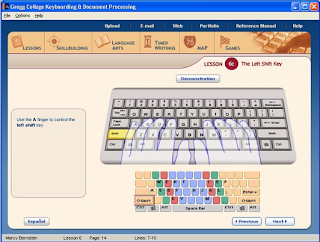
Dolphin Inc. (formerly www.dolphinsoft.com) was a boutique educational software company that worked primarily for educational publishers including McGraw-Hill, Pearson, Houghton Mifflin, and Educational Testing Services (ETS) creating software for textbooks and other educational products. Dolphin's work was nominated for Codie awards several times and the Criterion product by ETS (Dolphin worked on the web interface) was awarded a Codie in 2005. At its peak Dolphin had approximately 40 employees. The first products developed by Dolphin were on MS-DOS and the Apple II (6502 assembler!) in the 80s and the company migrated with technology into Windows and Macintosh software and then to web-based products. The company was acquired by Byron Preiss Multimedia in approximately 1996 and then when that merger unwound, the company was sold to American Education Corporate (AEC) in approximately 1999. Dolphin continued to develop product for external clients until 2005 when the missions wa...

Dolphin Write (WordPerfect 5.1 Compatible SW circa 1995)

Image
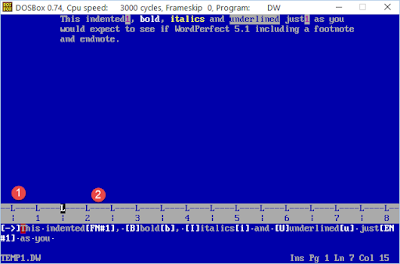
Ah, remembering programming in earlier years... Dolphin Inc. created software for a variety of educational publishers including Glencoe/McGraw-Hill and its Gregg line of keyboarding software products. Part of the product included a WordPerfect 5.1 compatible word processor that I created in my basement (of course!) around 1993/1994 shortly after coming to work for Dolphin in Gibbsboro, NJ (near Cherry Hill). The product was written in C and was an interesting, if intense, project created under a tight deadline and pressure from the client to replace a word processor ( NYWord ) that we had attempted to adapt unsuccessfully. A Gap Buffer  approach was used for managing the insertion of text and of course implementing base WordPerfect 5.1 functionality including the Show Codes feature, endnotes/footnotes, and even basic keystroke macros was fun. The first screen shot shows some of the features in action including indent, bold, italics, underline, footnotes, and endnotes. The ...

Phaser for HTML5 Game Development

Image
Just starting on an adventure in HTML5 game development using Phaser and thought I'd keep notes online. There's a bigger picture application goal that I have in mind, but it will start as a series of exercises and I want to record them while I'm learning. First I wanted to create an example of a polygon moving around the screen using the cursor keys. After some exploration of the examples and reading documentation it boiled down to this basic example. First the index.html file: 1: <!doctype html> 2: <html lang="en"> 3: <head> 4: <meta charset="UTF-8" /> 5: <title>Polygon Test</title> 6: <script src="js/phaser.js"></script> 7: <script src="js/polytest.js"></script> 8: </head> 9: <body> 10: <div id="phaser_game"> 11: </div> 12: <script type="text/javascript"...

Culture Hacking

Image
Ran across a couple of presentations that are relevant to building team culture, especially for virtual work groups. The first is a keynote by Jim McCarthy . I've been a long-term fan as he wrote a great book. See Pre-Agile Ideas: Jim McCarthy Videos for more. Here is the link to his keynote: Culture Hacking http://www.infoq.com/presentations/culture-hacking-singapore Some interesting quotes (he's very quotable) and take-aways: Get women involved! Technical teams lack diversity. "I'm not a real historian, but I like stories from history" "great editorial wall of China" "everything you do should be art" "team = product" Feeilings are "mad, sad, glad, afraid" "any process will work with presence" Book: Flow (P.S.) The other presentation that is full of tips for running virtual teams based on experience at InfoQ itself: Culture and Happiness in Virtual Teams http://www.infoq.com/presentations/cult...

Evils of Multi-tasking and Personal Kanban

Image
Great presentation (30 minutes) on why multitasking is poor for productivity and how personal Kanban (and Kanban in general) works. There is a great short exercise at the beginning of the video that illustrates the cost of context switching. The Evils of Multi-tasking and How Personal Kanban Can Help You (by Sandy Mamoli) http://www.infoq.com/presentations/multi-tasking-personal-kanban Kanban in a nutshell: 1) visualize your work flow, 2) limit your WIP I'm experimenting with a personal Kanban board made using a 30" x 20" project board: The Pomodoro Technique is also discussed ( http://pomodorotechnique.com/ ). I'm experimenting with a Pomodoro App on my iPhone  

Using Selenium with Excel VBA

Image
We had to change the names of 700 students in the student information system that I'm the product manager for at work. Instead of requesting that our support team write a database script, I figured it would be a good opportunity to try using Selenium ( http://www.seleniumhq.org ,  http://seleniumhq.wordpress.com ) to rename the students using the browser user interface. In the past I have written VBA (Visual Basic for Applications) scripts to control Internet Explorer and I wanted to extend that approach to control Firefox and/or Chrome. Excel VBA provides a very capable environment and the spreadsheet as an underlying model works very well for a class of problems. In this case we have a list of students already in the system and I added a couple of columns to contain the new first and last names. A simple loop through the rows using Selenium calls to manipulate the user interface and then record the results back in the spreadsheet is a straight-forward VBA macro. Of course, wi...