Posts

Eye-Tracking Links

Just collecting some links for a side research project. These are related to eye-tracking, especially as it relates to research in the Autism Spectrum Disorder (ASD) community. An outgrowth of my involvement with BioStream ( www.biostreamtech.com ). The Eyes Have It: Eye Tracking Data Visualizations of Viewing Patterns of Statistical Graphics https://digitalcommons.usu.edu/cgi/viewcontent.cgi?article=1803&context=gradreports saccadr: Extract Saccades via an Ensemble of Methods Approach https://cran.r-project.org/package=saccadr Webcam eye tracking close to laboratory standards: Comparing a new webcam-based system and the EyeLink 1000 https://link.springer.com/article/10.3758/s13428-023-02237-8


R Script for Building a List of Holidays

Found a list of holidays and customized it for company use. Thought some others might find it handy. https://github.com/davesides3/holidays

Eye-Tracking Options

Some links for various eye-tracking options: Tobii (hardware, variety of markets including gaming, well-established) https://gaming.tobii.com/ iMotions (hardware, higher-end research, well-established) https://imotions.com/eye-tracking/ GazeRecorder (Webcam Eye-Tracking with an API GazeFlow) https://gazerecorder.com/ https://gazerecorder.com/gazecloudapi/  (embed in your own webapp) RealEye (Webcam Eye-Tracking on a study-based platform) https://www.realeye.io/ Hawkeye (iOS using TrueDepth camera, limited to latest iOS devices) https://www.usehawkeye.com/ Skyle for iPad (hardware, new in 2020) https://eyev.de/en/ EyeZag (camera-based, no longer accepting new customers) https://eyezag.com/ WebGazer.js (camera-based, browser, open source) https://webgazer.cs.brown.edu/ SeeSo (mobile eye-tracking) https://seeso.io/ https://visual.camp/ Useful: 10 Most Used Eye Tracking Metrics and Terms https://imotions.com/blog/10-terms-metrics-eye-tracking/ And a summary related to mobile games...

Using R for Analyzing COVID-19 Clinical Trials from clinicaltrials.gov

Although I use R extensively in my work, samples can't be shared because of non-disclosure agreements with my clients. For this reason, I'm starting to build a portfolio of samples of my own work with R for data analysis and other tasks. Since COVID-19 is in the news now and I have experience with clinicaltrials.gov from my work with a biotech startup ( www.biostreamtech.com ), it seemed like a good way to start. The source code can be found at:  https://github.com/davesides/covid_19_clinical_trials Some techniques used daily include: select to remove, order, rename columns mutate to add columns or modify values in columns filter to eliminate rows from a data frame arrange to order rows in a data frame group_by and summarize to pivot replace_na to replace NA with (typically) zeros read_tsv (csv, etc.) to read delimited files packages readxl and writexl to read and write Excel files Many more examples to come, but I wanted to post something as a starting point.

Virtual Poker Experiment

Image
In these times of social distancing our monthly poker group wanted to find a way to meet virtually. Since we play many variations of poker (we've been meeting for about 25 years) we needed a solution that was flexible and also provides the interaction of a virtual BYOB happy hour. The solution we found will only work with a group that you trust and is based on the honor system. Don't consider this a competitor for PokerStars or another online casino. Here's what we tried this past Friday night that worked pretty well... (images blurred to protect the "innocent" 😉) We used Whereby (Pro Plan - $10/month) for the video group call supporting up to 12 callers comfortably. They offer a free plan if you want to try it out with up to 4 people (bridge, hearts or spades would work well with 4). This solution is very convenient since it does not require an install and we wanted to minimize technical support issues with the group. For the card table interaction we us...

Using CodeCommit with RStudio on Windows

Just some notes from my learnings around Git and AWS... Assuming you're not the one responsible for granting access to AWS CodeCommit in your organization and you receive three pieces of information, something like this: 1) ssh://git-codecommit.us-west-2.amazonaws.com/v1/repos/project_name 2) user: ABC123 3) Private Key (see below) The following article will be helpful: Setup Steps for SSH Connections to AWS CodeCommit Repositories on Windows After installing Git  consider installing software like Tortoise Git  for convenience. You might also want to install an SSH client like PuTTY . As part of the AWS instructions, you'll need to edit the config file in the c:\users\<username>\.ssh folder: Host git - codecommit .*. amazonaws . com User ABC123 IdentityFile ~/. ssh / codecommit_rsa and in the same folder, the codecommit_rsa file should contain the RSA key provided similar to the one below. Note that you might have to remove extr...

Life in a BioSoftTech Startup

Image
This past year or so I've been focused on my work with a startup company creating a 3D videogame (written in Unity) using eye-tracking technology to help those with Autism Spectrum Disorder improve social skills, emotion recognition, and eye contact. Check out the website for more detail ( www.biostreamtech.com ). A more established company in the "BioSoftTech" market is Akili Interactive . Now that the product is in clinical trials, I am moving to a part-time contract position and expect to be able to write more often here. I'm offering technical product/project management services too.

A Vision for a Simple Form Definition Language

Image
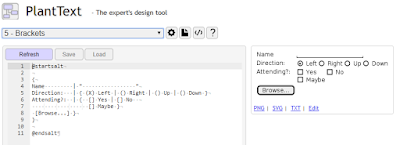
In my travels as a software product manager I've experienced repeated requests to create basic form entry into a SQL database for reporting. Typically these requests don't have a significant budget behind them and may involve a smaller number of users. Pointing non-technical staff to Google Forms or similar isn't that helpful and ideally we'd like to have the data easily incorporated into enterprise reporting (Office 365 environment in particular). Products like QuickBase have been used in the past, but aren't integrated well in our O365 environment and have significant licensing costs. There are other products (PHP/MySQL solutions seem to be common) for easy specification of forms using WYSIWYG editors, but I'm looking for something that lets me define the input form and related SQL tables/columns directly. I've recently been impressed with a SQL Report Builder interface in an application we use at work ( Genius SIS ). It provides a quick way to create ...

Using the Excel Sunburst Chart for Visualizations

Image
Though not a new concept, Office 365 (Excel 2016) has a Sunburst Chart type (a.k.a. Multi-level Pie or Donut Chart) that is very handy for presenting hierarchies. Here are some ideas to consider: A series of project portfolios: A phone "wheel" like a phone tree (recently used this idea myself): There is more sophisticated color formatting available in a variety of JavaScript libraries such as FusionCharts and HighCharts , but having the chart type in Excel makes it very approachable for those wanting an ad hoc visualization that doesn't require any programming.

DOT (GV) Graph Definition Language

Image
Playing around with graphing tools and ran across DOT (.GV) which meets the needs for simplicity that I have with a current side project. Just using this page to collect information in case it's useful to someone else. GVEdit (Graphviz) http://www.graphviz.org/ Helpful StackOverflow posting http://stackoverflow.com/questions/6344318/pure-javascript-graphviz-equivalent Graphviz in the Browser http://www.webgraphviz.com/ Based on this JavaScript library https://github.com/mdaines/viz.js Google Charts Image Charts API also supports DOT for now... (deprecation notice) https://developers.google.com/chart/image/docs/gallery/graphviz As long as Google supports it, this is a no-brainer way to show DOT scripts in the browser. Using Google Charts Image Charts API: https: // chart . googleapis . com / chart ? cht = gv & chl = digraph{node1[label = "Root%20Node" ][shape = box];node1 -> node2[ dir = both][label = " %202% 20inches" ];node2 -> {...

Parsing UserForm and Code Modules in VBA

Image
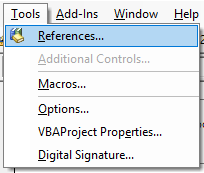
Some research into what's possible with VBA and code generation of JavaScript for a proof-of-concept project . In order to parse a UserForm and VBA code modules, first enable Microsoft Visual Basic for Application Extensibility in the Tools / References feature: For this example create a simple UserForm: The Parse button should be wired up to call the Parse() subroutine in the Module1 code module. The entire source will be listed in the worksheet when this Parse routine is run. Here's the code to place in Module1: 1: Option Explicit 2: 3: Sub Macro1() 4: Form1.Show 5: End Sub 6: 7: Sub Parse() 8: Dim cmpComp As VBIDE.VBComponent 9: Dim cCont As Control 10: Dim lRow As Long 11: Dim lLine As Long 12: 13: Sheets("Sheet1").Activate 14: ActiveSheet.UsedRange.ClearContents 15: 16: lRow = 0 17: lRow = SetRow(lRow, "Show UserForm and VBA Code Modules") 18: lR...

Converting Excel VBA Prototypes to Production Reports on the Web

Image
I'd previously explored how to move Excel VBA prototypes into a production environment and did not find a satisfying path with Microsoft technologies. An idea for an approach that I may try as a proof of concept: 1. The Excel VBA Macro would need to be created with a specific set of coding rules and form controls. This is not intended to be a general purpose macro converter and is just being designed for some of the practices I have used over the years. It might serve as a basis for a broader converter down the road. There is still a lot of code written in Excel VBA and it's not a market that is attracting a lot of developer tool competition. It's worth looking into building a set of libraries in VBA similar to how the Google Apps Script (GAS) functions are organized for possible leverage there some day, but the intent is not to put one prototype product into another prototype so GAS is not the target of the code generation in step 3 below. A useful site related t...

How to Move Excel VBA to a Production Environment?!

Image
I was thinking of a quick-and-dirty solution for moving VBA to a server, but found it was essentially shot down by Microsoft a long while ago: Considerations for server-side Automation of Office https://support.microsoft.com/en-us/kb/257757 I have some other ideas of using an Excel VBA metaphor (in essence a stack of sheets) within a Node.js module, perhaps implementing a set of functions similar to Google Apps Script (GAS) to reduce the learning curve. A simple a way to move Excel VBA (which is very productive in a corporate Excel environment) to a web front-end for low volume self-serve production use is needed. Any idea has dozens if not more people around the world thinking about it - maybe someone has already solved this problem and I can just use it? There are postings on Stack Overflow to figure this out, but consolidated here for quick review. Here's an example of calling an Excel VBA Sub and Function from PowerShell.  PowerShell code: 1: $objExcel = new-...

Natural Order Evaluation of Spreadsheet Cells

Image
Instead of just tossing this bit of history in the trash I decided to scan and post it for posterity. In the mid-80s I worked for EMS/McGraw-Hill on a series of products for the Gregg division that were used to train students on how to use Lotus 1-2-3 and spreadsheets in general. We created a product called McGraw-Hill Integrated Software (MHIS) which included a spreadsheet module (written in C for MS-DOS). The memo I wrote explaining the implementation of natural order evaluation in a spreadsheet vs. column-order evaluation in a spreadsheet is below. It was fun to see that I was able to use my computer science education to bring a postorder traversal of a binary tree to the project!

Dolphin Inc.

Image
Dolphin Inc. (formerly www.dolphinsoft.com) was a boutique educational software company that worked primarily for educational publishers including McGraw-Hill, Pearson, Houghton Mifflin, and Educational Testing Services (ETS) creating software for textbooks and other educational products. Dolphin's work was nominated for Codie awards several times and the Criterion product by ETS (Dolphin worked on the web interface) was awarded a Codie in 2005. At its peak Dolphin had approximately 40 employees. The first products developed by Dolphin were on MS-DOS and the Apple II (6502 assembler!) in the 80s and the company migrated with technology into Windows and Macintosh software and then to web-based products. The company was acquired by Byron Preiss Multimedia in approximately 1996 and then when that merger unwound, the company was sold to American Education Corporate (AEC) in approximately 1999. Dolphin continued to develop product for external clients until 2005 when the missions wa...

Dolphin Write (WordPerfect 5.1 Compatible SW circa 1995)

Image
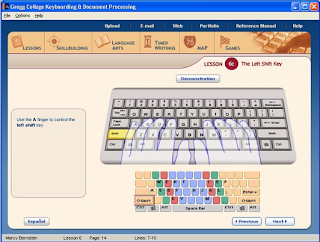
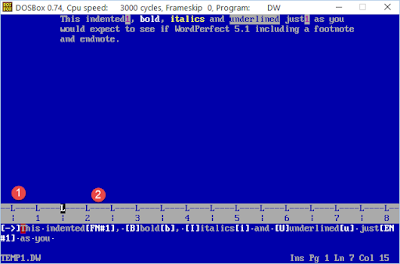
Ah, remembering programming in earlier years... Dolphin Inc. created software for a variety of educational publishers including Glencoe/McGraw-Hill and its Gregg line of keyboarding software products. Part of the product included a WordPerfect 5.1 compatible word processor that I created in my basement (of course!) around 1993/1994 shortly after coming to work for Dolphin in Gibbsboro, NJ (near Cherry Hill). The product was written in C and was an interesting, if intense, project created under a tight deadline and pressure from the client to replace a word processor ( NYWord ) that we had attempted to adapt unsuccessfully. A Gap Buffer  approach was used for managing the insertion of text and of course implementing base WordPerfect 5.1 functionality including the Show Codes feature, endnotes/footnotes, and even basic keystroke macros was fun. The first screen shot shows some of the features in action including indent, bold, italics, underline, footnotes, and endnotes. The ...

Phaser for HTML5 Game Development

Image
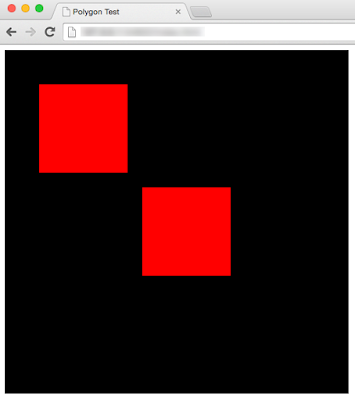
Just starting on an adventure in HTML5 game development using Phaser and thought I'd keep notes online. There's a bigger picture application goal that I have in mind, but it will start as a series of exercises and I want to record them while I'm learning. First I wanted to create an example of a polygon moving around the screen using the cursor keys. After some exploration of the examples and reading documentation it boiled down to this basic example. First the index.html file: 1: <!doctype html> 2: <html lang="en"> 3: <head> 4: <meta charset="UTF-8" /> 5: <title>Polygon Test</title> 6: <script src="js/phaser.js"></script> 7: <script src="js/polytest.js"></script> 8: </head> 9: <body> 10: <div id="phaser_game"> 11: </div> 12: <script type="text/javascript"...

Culture Hacking

Image
Ran across a couple of presentations that are relevant to building team culture, especially for virtual work groups. The first is a keynote by Jim McCarthy . I've been a long-term fan as he wrote a great book. See Pre-Agile Ideas: Jim McCarthy Videos for more. Here is the link to his keynote: Culture Hacking http://www.infoq.com/presentations/culture-hacking-singapore Some interesting quotes (he's very quotable) and take-aways: Get women involved! Technical teams lack diversity. "I'm not a real historian, but I like stories from history" "great editorial wall of China" "everything you do should be art" "team = product" Feeilings are "mad, sad, glad, afraid" "any process will work with presence" Book: Flow (P.S.) The other presentation that is full of tips for running virtual teams based on experience at InfoQ itself: Culture and Happiness in Virtual Teams http://www.infoq.com/presentations/cult...

Evils of Multi-tasking and Personal Kanban

Image
Great presentation (30 minutes) on why multitasking is poor for productivity and how personal Kanban (and Kanban in general) works. There is a great short exercise at the beginning of the video that illustrates the cost of context switching. The Evils of Multi-tasking and How Personal Kanban Can Help You (by Sandy Mamoli) http://www.infoq.com/presentations/multi-tasking-personal-kanban Kanban in a nutshell: 1) visualize your work flow, 2) limit your WIP I'm experimenting with a personal Kanban board made using a 30" x 20" project board: The Pomodoro Technique is also discussed ( http://pomodorotechnique.com/ ). I'm experimenting with a Pomodoro App on my iPhone  

Using Selenium with Excel VBA

Image
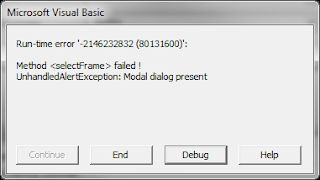
We had to change the names of 700 students in the student information system that I'm the product manager for at work. Instead of requesting that our support team write a database script, I figured it would be a good opportunity to try using Selenium ( http://www.seleniumhq.org ,  http://seleniumhq.wordpress.com ) to rename the students using the browser user interface. In the past I have written VBA (Visual Basic for Applications) scripts to control Internet Explorer and I wanted to extend that approach to control Firefox and/or Chrome. Excel VBA provides a very capable environment and the spreadsheet as an underlying model works very well for a class of problems. In this case we have a list of students already in the system and I added a couple of columns to contain the new first and last names. A simple loop through the rows using Selenium calls to manipulate the user interface and then record the results back in the spreadsheet is a straight-forward VBA macro. Of course, wi...